Making Smartwatch Oxygen Data Make Sense
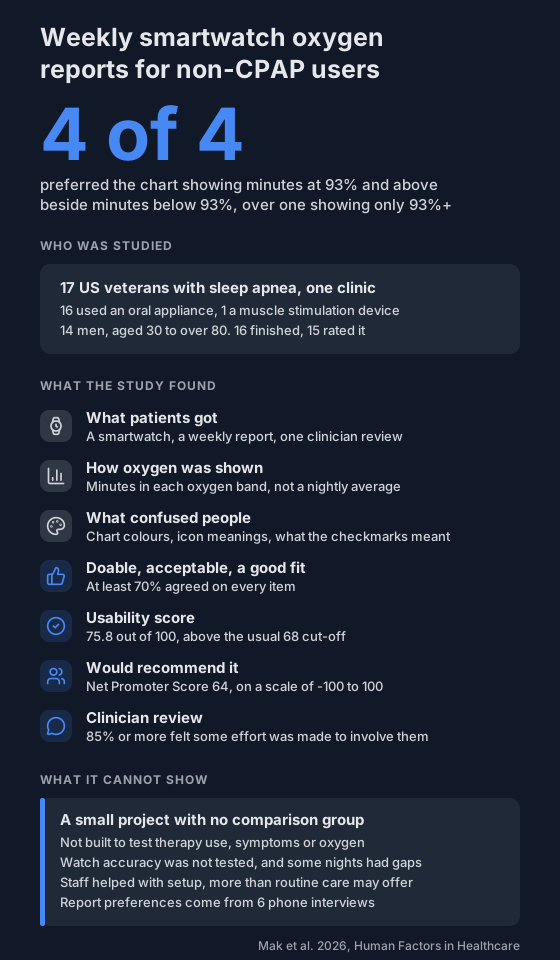
17 veterans using sleep apnea therapies other than CPAP got a weekly report of their smartwatch oxygen data. All 4 who compared two layouts preferred seeing time at 93% and above beside time below 93%.
A CPAP machine logs every night you use it. An oral appliance or a positional device usually gives you no nightly data between sleep studies.
A team at a US veterans sleep center in Los Angeles tried filling that gap with a smartwatch. They turned its overnight oxygen readings into a weekly report, then kept reworking it around what patients found confusing. It's the same group that ran the trial on wearable oxygen reports and CPAP use.
Who took part?
- 17 veterans with obstructive sleep apnea, all on a therapy other than CPAP.
- 16 used an oral appliance and 1 used a neuromuscular electrical stimulation device.
- 14 were men. Ages ran from the 30s to over 80.
- They were a convenience sample from one clinic, and kept the smartwatch at the end.
- 16 finished the programme and 15 filled in the final survey.
What was in the report?
Each week, patients got a link to a report. The final version had three parts:
- Overnight oxygen. A bar chart of minutes spent in each oxygen band, such as 93% to 100%, 88% to 92% and 80% to 87%.
- Therapy use. A green circle under each night: ticked if they said they used their therapy, open if not.
- How they felt. Average scores from 12 weekly questions on symptoms, tiredness, alertness, mood and daily life.
The watch's own app shows an average oxygen level. The team chose time in each band instead, because sleep apnea causes many short dips that an average smooths over. The sleep clinician picked the 93% cut-off from the way CPAP machines commonly report oxygen.
At the end, each patient went through their final report with a sleep clinician.
What made it easier to read?
The team ran four rounds, changing the report after each one. In the last round, 6 patients talked an interviewer through the report by phone, saying out loud how they read it.
- Both sides of 93%. 4 of them were shown two versions: one with minutes at 93% and above, and one with minutes above and below 93% side by side. All 4 preferred the side-by-side one.
- Why. Patients said the contrast made it easier to understand, that the lower readings were worth knowing, and that seeing both felt less negative.
- Simpler symptom chart. The symptom scores went from a speedometer, to thermometer icons, to a coloured bar chart that confused people. They ended up as bars in one neutral colour with the numbers printed on them.
- Bigger chart. A notes section was called redundant, so it was removed and the oxygen chart enlarged.
- Unclear symbols. Some read the ticks under the chart as nights they wore the Fitbit, not nights they used their therapy. The team kept the ticks and explained them in the walkthrough below instead.
- A short introduction. From round 3, patients got a walkthrough of the report, first by phone and later as a short video. It explained that nights with missing watch data would show gaps.
- Saying no to extras. Some patients asked for sleep length and the number of awakenings. The team left those out to keep the report simple, and noted them for the clinician to discuss.
How did people rate it?
From the 15 who answered the final survey:
- At least 70% agreed or completely agreed with every item on whether the programme was doable, acceptable and a good fit.
- Usability scored 75.8 out of 100. Above 68 is usually taken as acceptable.
- Net Promoter Score was 64, on a scale from -100 to 100, where 0 or above counts as good.
- 85% or more said at least some effort was made to involve them in the discussion during the clinician review.
What can't it tell you?
- Whether anything changed. The project wasn't set up to test therapy use, symptoms or oxygen, and those weren't analysed as outcomes.
- Whether it holds elsewhere. It was a small convenience sample at one clinic with no comparison group.
- Whether the oxygen numbers were right. The project didn't test the watch's accuracy, and some nights had missing data. See smartwatch SpO2 vs a pulse oximeter.
- How much rests on a few people. The layout preference comes from 4 patients, in interviews used to refine the report, not for formal analysis.
- Whether it works without help. Staff set up the watches, fixed problems and explained the report. The authors say routine care may not offer that much support.
The project was funded by the US Department of Veterans Affairs Office of Connected Care and the National Institutes of Health. The authors declare no competing interests.
What can you do with this?
If you log your overnight oxygen yourself, the layout these patients preferred is easy to copy:
- Look at how much of the night sat above and below a line, not one average for the night. Time below 90% works the same way.
- Note next to each night whether you used your mouthpiece or positional device, so you can see the two together.
- Keep it to a few numbers you understand.
You can view a recording night by night in the session viewer. For how these therapies compare in studies, read positional therapy vs mouthpiece vs CPAP, and take questions about your therapy to your sleep clinic. Here's how to share your oximeter data with your doctor.
Not a medical device. Does not diagnose, treat or prevent any condition. Discuss results and changes with a clinician.
References
- Mak S, Ghadimi S, Der-McLeod E, Naeem S, Moore V, Gil L, Chohan M, Zeidler M, Ash G, Fung C. Feasibility, acceptability, and usability of a novel self-monitoring program utilizing a consumer-grade wearable device paired with sleep-related patient-reported outcomes for veterans with obstructive sleep apnea. Human Factors in Healthcare. 2026;10:100147. doi:10.1016/j.hfh.2026.100147